Find more economical metal building frame designs.

Designing a frame in StructOpt takes minutes, not hours.

StructOpt is an independent product and is not affiliated with MBS.

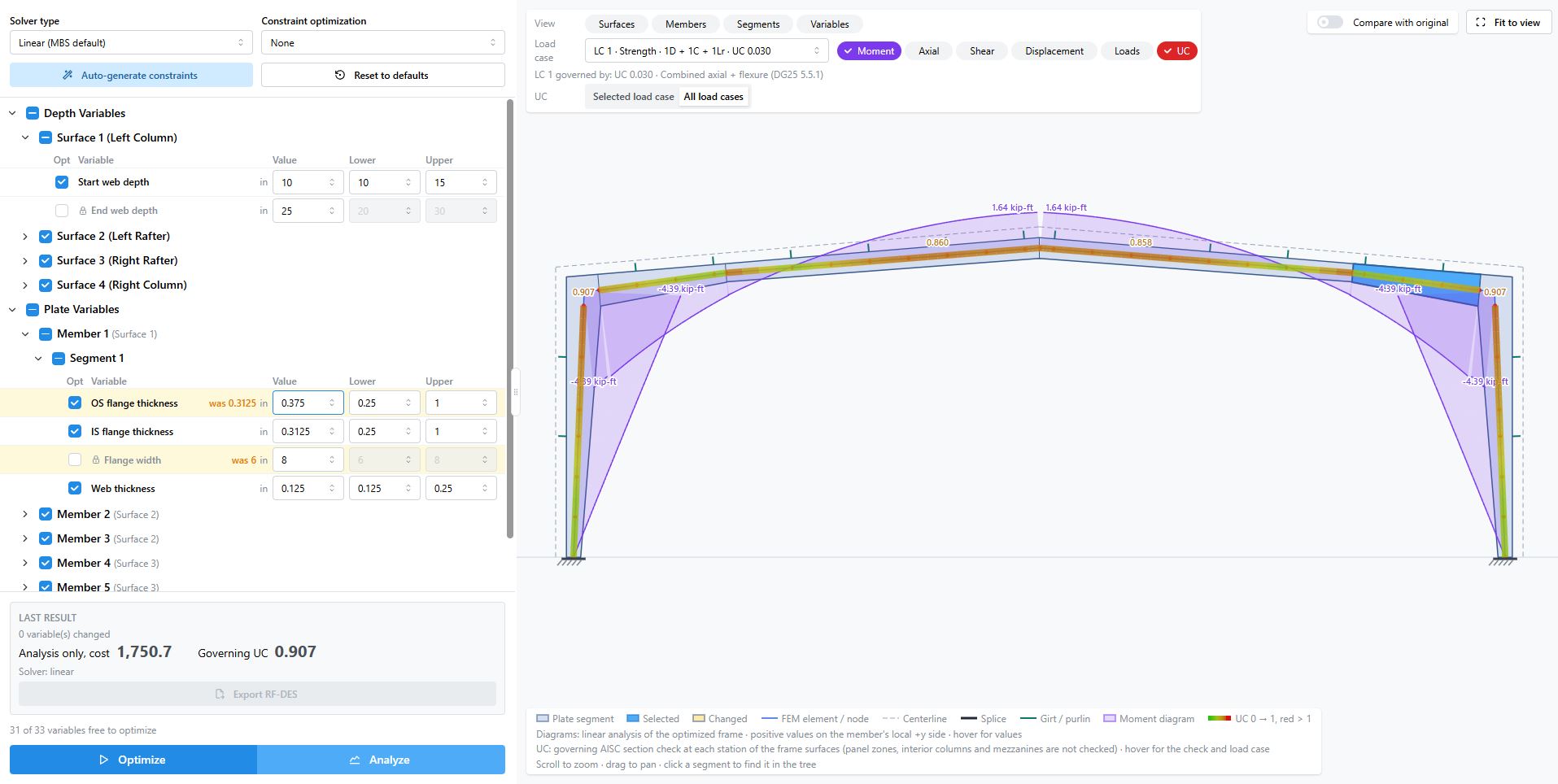
StructOpt interface showing design variables beside a portal frame study

StructOpt Benefits

Our first product is aimed at the repetitive part of a frame study: finding the most efficient plate and depth combinations.

01

Save big

StructOpt often tries over 10000 combinations in minutes, finding the most efficient plate and depth combinations.

02

Reduce repetitive manual iteration

Optimizing a rigid frame on StructOpt takes only a few minuties, removing the tedious portion from the engineer's plate.

03

Support more economical estimating

Estimators can consider a proposed frame while pricing a building. Lets estimators make more economical proposals in less time.

04

Advanced analysis

Conduct advanced eigenvalue buckling analysis on the proposed frame to ensure it is stable.

How it works

StructOpt sits alongside MBS. Use it in four easy steps.

  1. 01

    Import an existing RF-DES.out file

    Start from a model you already use in MBS.

  2. 02

    Configure design variables and optimization limits

    Optionally, configure design variables and optimization limits.

  3. 03

    Run optimization and review the proposed frame

    Inspect the frame StructOpt proposes before you take it any further.

  4. 04

    Export the updated input file for continued work in MBS

    Carry the optimized settings back into the MBS workflow you already use.

Engineers can review proposed designs within their established checking and approval process.

Demonstration

A short walkthrough of the StructOpt workflow.

FAQ

Who is the software intended for?

StructOpt is for PEMB (pre-engineered metal building) manufacturers. A demonstration is meant for the people who specify, design, estimate, or approve frames: engineering managers, structural engineers, estimators, and company owners.

How does it fit into MBS?

StructOpt is an add-on to an existing MBS workflow. Import an existing RF-DES output file, configure design variables and optimization limits, review the proposed frame, and export updated settings for continued work in MBS.

Does it replace engineering review?

Proposed designs go through your engineers’ established checking and approval process. StructOpt presents a frame for that review.

How can a manufacturer arrange a demonstration?

Send your company name, and availability for a demonstration. We will get back to you within 24 hours.

Email dejan@structopt.com.

Next step

Discuss a demonstration around your workflow.

If you manufacture metal buildings and want to see how StructOpt fits the way your engineers already work, write to arrange a demonstration.